
How to use Prompt Forge
Prompt Forge turns a rough idea or a messy brief into a clean, structured prompt any LLM or Claude Code can run. Here is the whole tool, field by field.
Good prompts are structured: they spell out the role, the context, the task, the constraints, and the shape of the answer. Writing that by hand every time is tedious. Prompt Forge does it for you: you paste something messy, and it hands back something an LLM can execute cleanly.
The interface, mapped
Everything lives on one screen. Your raw text goes on the left, and the finished prompt appears on the right.
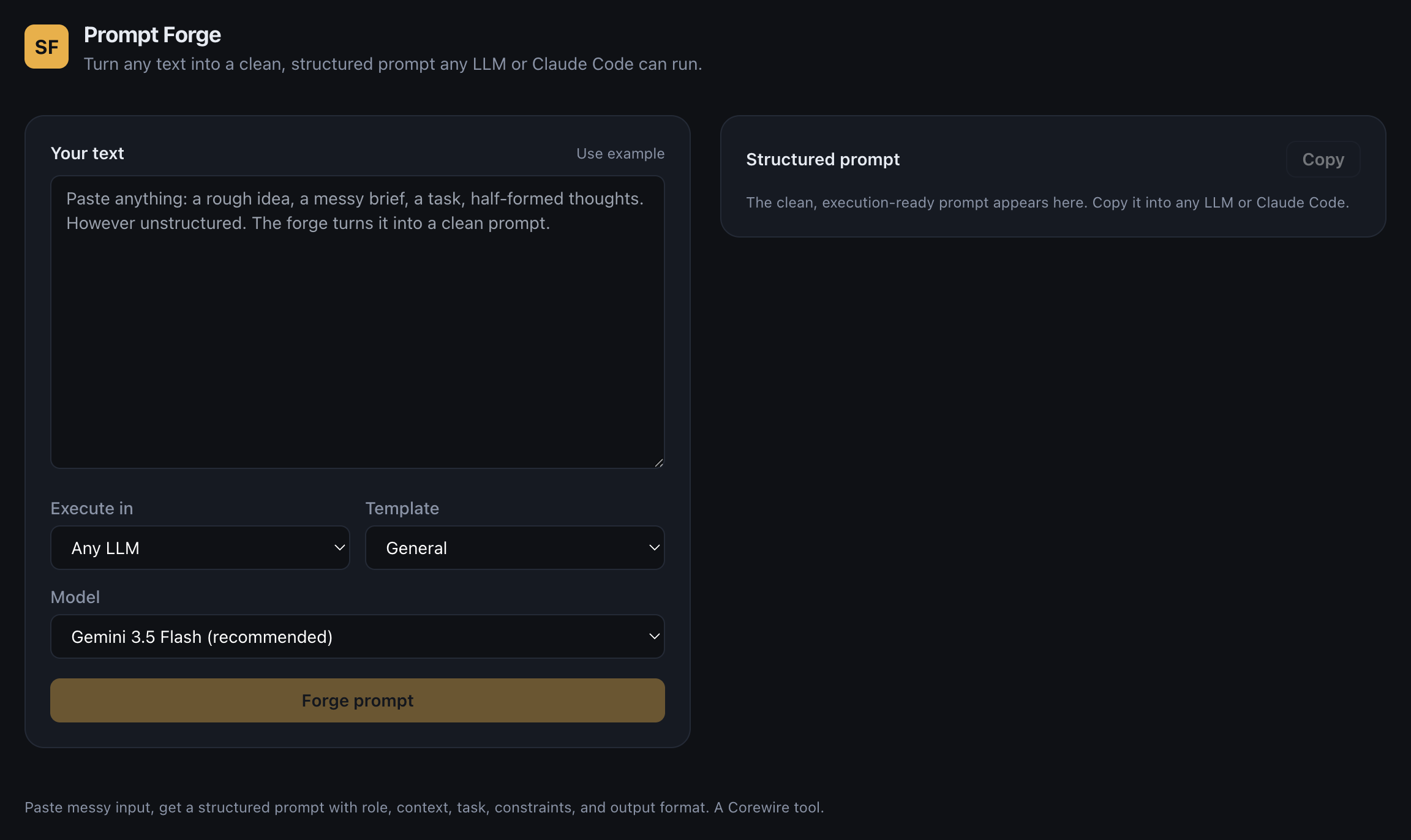 1234567
- Your text. Paste anything here: a rough idea, a half-formed brief, a few bullet points. It does not need to be tidy.
- Use example. Loads a sample brief so you can watch the forge work before writing your own.
- Execute in. Where you will run the result. Pick “Any LLM” for ChatGPT, Gemini, or Claude chat, or “Claude Code” to shape the prompt for the coding agent.
- Template. The shape of the output. “General” fits most tasks; choose a specialised template (such as Conversion ICP strategy) when it matches your goal.
- Model. Which Gemini model does the forging. “Gemini 3.5 Flash (recommended)” is the balanced default; Flash-Lite is faster.
- Forge prompt. Click to generate. The structured prompt appears on the right within a few seconds.
- Structured prompt and Copy. Your finished prompt lands here, split into Role, Context, Task, Constraints, and Output Format. Press Copy and paste it wherever you work.
Step by step
- Paste your rough brief into Your text (1). Do not polish it first: the messier input shows off what the tool fixes.
- Set Execute in (3) to where you will run it, then pick a Template (4). Leave Model (5) on the recommended default.
- Click Forge prompt (6) and wait a moment.
- Read the Structured prompt (7), click Copy, and paste it into your LLM or Claude Code.
A real before and after
Here is the kind of thing you might paste in, unedited:
One click later, Prompt Forge returns a fully structured prompt on the right:
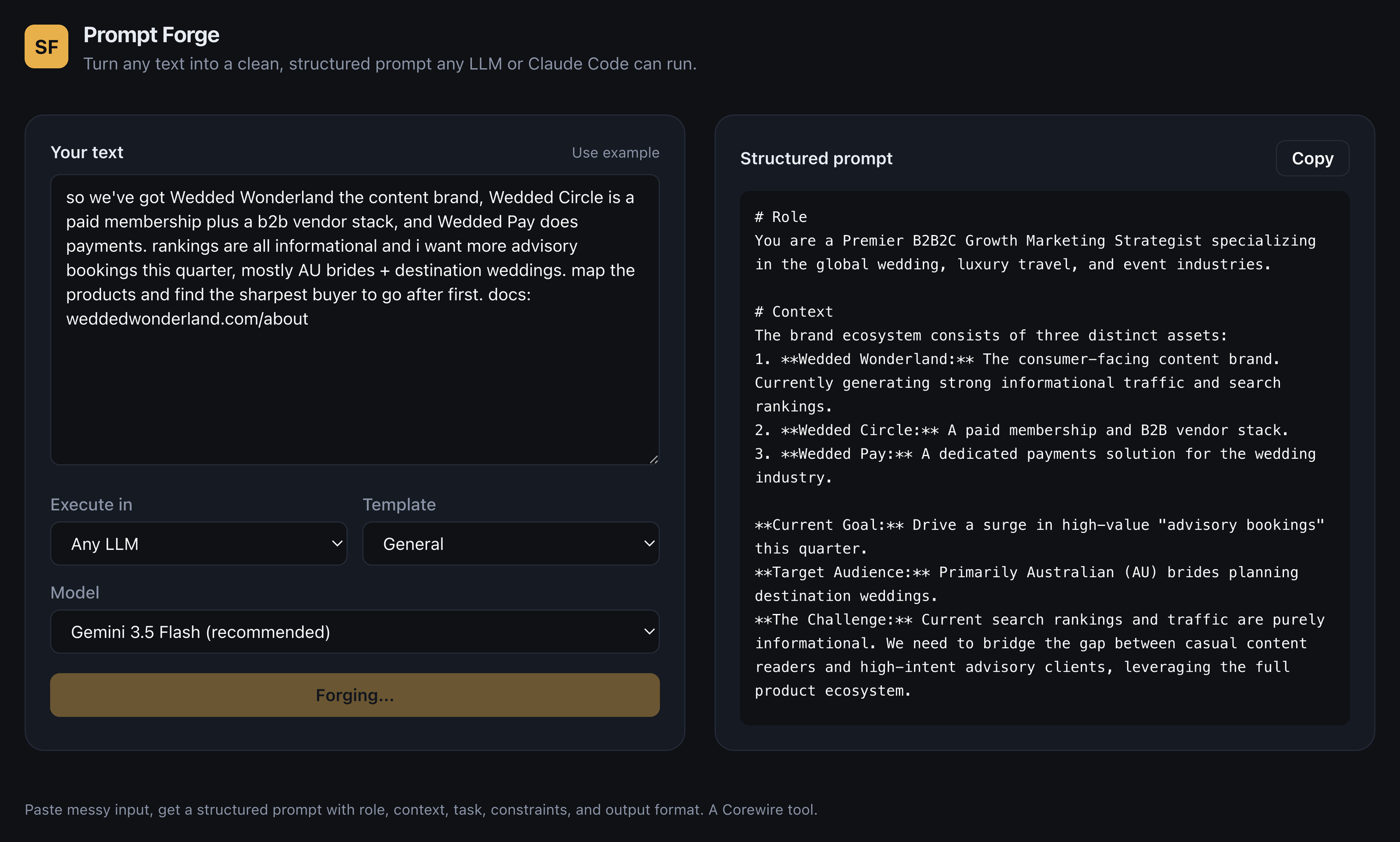
The structured prompt it produced, in part:
# Role
You are a Premier B2B2C Growth Marketing Strategist specializing in the global wedding, luxury travel, and event industries.

# Context
The brand ecosystem consists of three distinct assets:
1. Wedded Wonderland: The consumer-facing content brand, generating strong informational traffic.
2. Wedded Circle: A paid membership and B2B vendor stack.
3. Wedded Pay: A dedicated payments solution for the wedding industry.

# Task
Analyze the ecosystem and deliver an action plan to drive advisory bookings this quarter...
The full output continues with Constraints, an Output Format spec, and Success Criteria: everything an LLM needs to return a usable answer on the first try.
Tips
- Match “Execute in” to your destination. The Claude Code option adds structure the coding agent reads well; “Any LLM” keeps it portable.
- Templates save the most time on repeat tasks. If you keep forging the same kind of prompt, a specialised template beats “General”.
- Stick with the recommended model unless you need speed, in which case Flash-Lite is quicker with a small quality trade-off.
- The messier your input, the more it helps. Clean prompts barely need the forge; rough ones are where it shines.
Related resources
- Prompt templates: ready-made starting points to forge.
- Cheat sheets: prompt anatomy and common pitfalls.
- Glossary: the terms behind the tool.